NO KNOBS
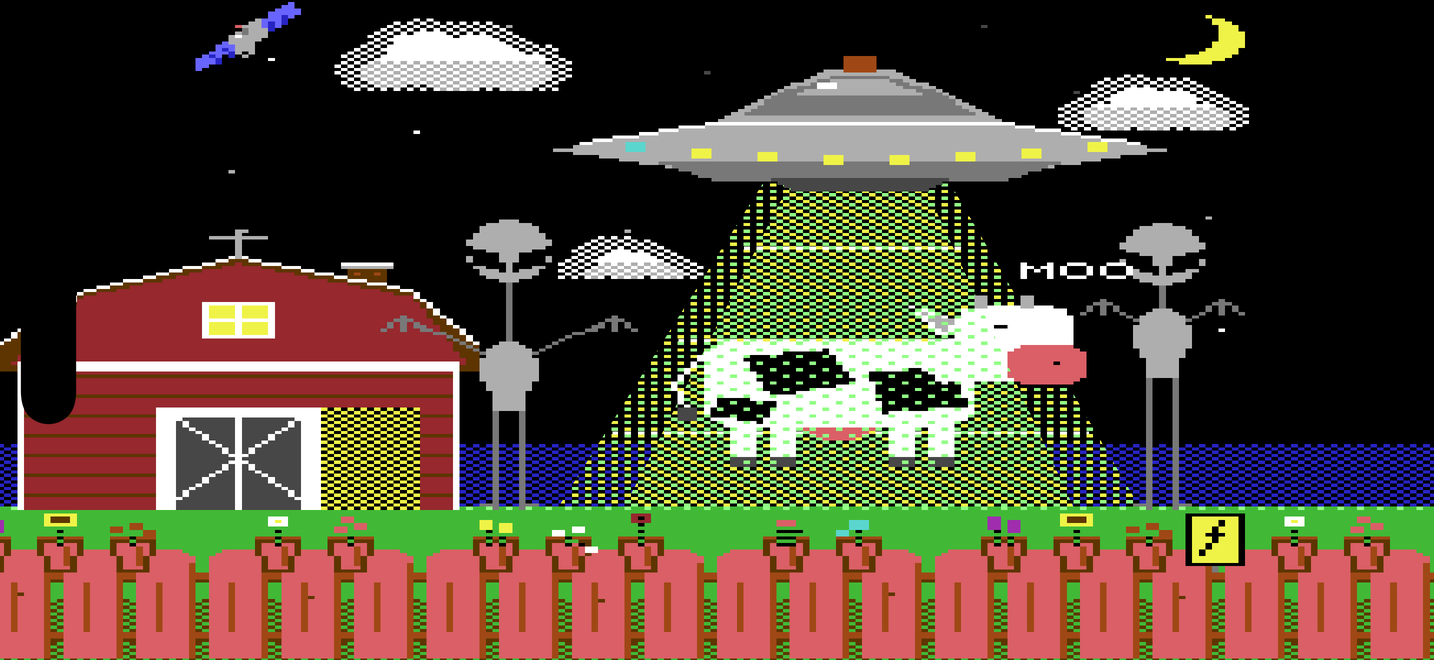
- A farm at night, drawn in the sixteen colours of a Commodore 64.
Everything you see is a control, and nothing else is on
the screen
- The fence is the keyboard: planks are white keys, flower pots are
the black ones
- The left alien is the envelope — pull its body, stretch its neck,
lift and reach its hands. The right alien is the filter
- Lift the cow's tail for detune, lift the whole cow for reverb.
Slide the barn door for volume, raise the chimney for drive, tap
the hayloft window to crush the bits
- The clouds are the LFO: how much, how fast, and what shape. Drag
the saucer's dome to raise it, and the echo grows with it
- The saucer's eight lights are the sounds, the moon changes the
bank: twenty-four sounds, each remembering your edits
THE SOUND
- Two oscillators with polyBLEP saw and pulse, an endless Shepard
stack for tractor-beam lifts, noise, ring modulation
- A state-variable filter that goes from low-pass to high-pass to
band-pass, with envelope, key tracking and LFO
- Real stereo: oscillators spread across the field, voices placed by
key, per-voice pan wobble, ping-pong tape echo, a spring-like
reverb per side, bit crusher and drive
- A hold latch (the electric-fence sign) so chords keep sounding
with no fingers on the screen
IN THE STUDIO
- AUv3 instrument for AUM, Drambo, Logic Pro, GarageBand and
more — the same picture inside the host, and every control is
a host parameter you can automate
- MIDI 2.0 and full MPE: per-note pitch bend, pressure and timbre,
zone configuration understood, with a bend range you can set
- Plays in the background from a MIDI keyboard or the hold latch;
save and load your own presets from the transmission log
ON YOUTUBE
A review of ABDCTN by someone else.
──────────────────────────────────────────────
SUPPORT
Questions, bug reports, feature requests:
hello [at] hejluxom.com
Include your device and OS version
when reporting a problem.
FAQ
Where are the settings?
Tap the satellite in the top-left corner.
The transmission log has MIDI input, channel and MPE, the preset
buttons, and a way to leave five cows on the App Store.
Where is the plug-in?
Open your AUv3 host and load the Audio Unit
instrument “hejluxom: ABDCTN”. If it doesn't appear, launch the
ABDCTN app once, then restart the host.
I changed a sound and now I want the original back.
Hold the sound's light on the saucer until it
blinks, then hold it again. The sound forgets everything you taught
it. We call this mercy.
Why is the cow floating?
Because you turned the reverb up. Put her down and the room
gets smaller.